Showing posts with label Pinnacle Series. Show all posts

Monday, 23 November 2020

Saving Human Resource administration time with Pinnacle Series

Pinnacle Series has long been associated as an e-learning tool within the Engineering, Architectural and CAD environments. The platform is already pre-loaded with content for a variety of industry software, with the ability to store your own learning resources, helping with organisational knowledge retention.However, there is so much more to the platform.

In addition to a learning tool, PinnacleSeries is also the ideal tool for assisting with organisational processes. In this blog, I am going to focus on how the platform can support administration within the HR department.

Pinnacle Series for HR

Whennew starters join a company, the admin required during their first days can include:

- Telephone extension directory
- Management Hierarchy
- Time sheet instructions
- Health and Safety Documents
- Car Parking information

Providing this information and discussing each element to each new starters requires time and effort within HR.However, this can be easily streamlined by loading these documents into PinnacleSeries and adding new starters into an Induction workgroup. This willallow themto be given all the necessary documentsin just a few easy steps.When documents and processes are updated, employees will always have access to the latest version.

A workgroup is created within the Work Centre by clicking the Toolbox Icon.


Click ‘Create Workgroup’ and name it‘Induction’.


Once your Pinnacle Series administrator has loaded your company documents, share these to your Induction Workgroup. These can remain for future New Starters.

Go to the members tab and Add Members. Click on the Groups and select Induction.


All that remains is to go to the Pinnacle Series Management Utility and add new starters into the Induction Group. This is easily done by selecting the user, clicking modify then adding them to the Induction Group.


This last step is all that is needed for future new starters.
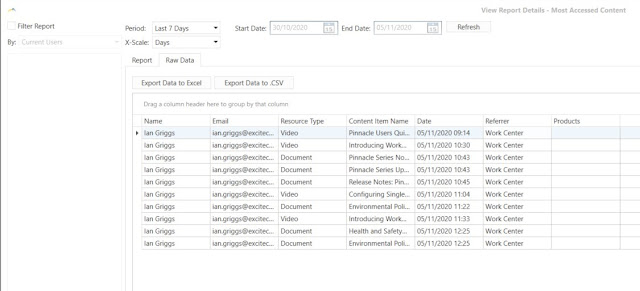
Another benefit of using Pinnacle Series for HR is that all document usage is recorded. 
This will assist HR during company Audits to provide proof that documents have been read.


I hope you have found this blog useful.

Please contact us for further information regarding Pinnacle Series.

https://www.symetri.co.uk/products/pinnacle-series

Wednesday, 13 December 2017

Creating Custom Content using Pinnacle Series


Pinnacle Series is an interactive e-learning and productivity platform developed by Eagle Point Software that connects people to the answers they need, when they need them. From Autodesk-specific training to HR processes and procedures, this platform can support a plethora of content, tailored to your organisation’s needs. 


Our most recent Pinnacle Series webinar presented the software’s content creation capabilities, and featured Phil Sawyer, BIM and IT Director at architectural practice ADP, a proficient Pinnacle Series user who is using Pinnacle to drive their in-house skills training.
The webinar started with a presentation of the problems that this e-learning and productivity platform can help managers solve. Jeff Rouse, Content Development Manager at Eagle Point Software focused on three challenges that management staff are confronted with:

  • Staff trying to complete work “their way”, often using incorrect methods
  • Teaching staff to use the tools they have 
  • Allowing staff to help themselves when encountering a problem, using vetted troubleshooting tools

The webinar started with a presentation of the problems that this e-learning and productivity platform can help managers solve. Jeff Rouse, Content Development Manager at Eagle Point Software focused on three challenges that management staff are confronted with:

  • Staff trying to complete work “their way”, often using incorrect methods
  • Teaching staff to use the tools they have
  • Allowing staff to help themselves when encountering a problem, using vetted troubleshooting tools

Another aspect of Pinnacle Series that Jeff presented was the fact that content can be customised to suit the requirements and training needs of different departments. One Learning Path can focus on the Onboarding of New Employees and can include different courses from different departments (Technical, Sales etc.), whilst another could focus on the Fire Exit Procedure. This feature gives Content Managers a lot of flexibility in the way they build workflows for different types of employees.

Jeff’s presentation was followed by Phil Sawyer’s who spoke about how his company – ADP - uses Learning Paths to train staff. According to Phil, “Pinnacle Series is very good to train new people to use new software, allowing them to be productive very early on.” He also emphasised the ability to run quizzes which enable line managers to understand if employees are learning and retaining new information.


To learn more about this award-winning e-learning and productivity platform, please contact us.

To watch the webinar recording, please click on the image below.

What’s New in AutoCAD Electrical 2025

This blog will examine what’s new in AutoCAD Electrical 2025. Automatic Reports Enhancement In AutoCAD Electrical 2025, you can now cre...