As an Application Specialist with over 25
years of training Autodesk applications, I have recently noticed there has been
a growing interest from delegates attending SYMETRI’s AutoCAD
training courses to advance their skills with AutoCAD
Beyond the Basics and the AutoCAD
Advanced courses.
Why are more learners attending more
advanced course?
Over the past months, I asked my students
why there has been an increased interest in more advanced AutoCAD
training courses.
The most common answers, is that their
company has reached a plateau, the safe known workflows are not efficient
anymore, many CAD
drafting staff have retired and the time has come to refresh and reskill to advance
the business to the next level.
I discovered the group dynamic to be extremely
exciting in the Beyond
the Basics and Advanced course, as I notice long time CAD users look at new
features and workflows to adapt and apply to their needs in the design office.
Our follow-on courses are very much a hands-on skill building experience.
“Can I put the area of a room in a
table”
During these more advanced training
courses, I tend to describe features that will streamline a workflow. For
example, when I trained a group of delegates from the world of space planning,
where they asked: “Can I put the area of a room in a table?” The answer being “yes”,
allows us to discover the workflow to achieve this goal.
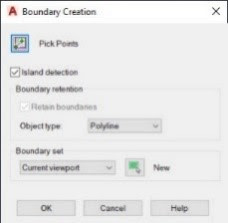
First, we looked at the boundary command.
We then picked a point inside a room using
the Object type as Polyline.
This created a closed polyline bounding one
of the rooms. There is an entry which shows the Area and Length in the
properties under Geometry. Using that information, we can populate given cells
in a table.
Over in Paper Space we created a simple table
to display Room Name, Room Perimeter and Room Area. In that table, we double
clicked on the data cell under Room Perimeter and selected field in the Data
menu.
Select object on the left field names in
the field dialogue box, and then select the polyline. You can select the
polyline model line even when you are in Paper Space.
We need Length to describe our room
perimeter and Decimal for format.
In Additional Format we used a conversion
factor of 0.001 to convert our millimetres unit size to meters for our table
entry.
This gave us a value that represented
Metres in Length for the perimeter of the room or boundary that we created.
This value is dynamic so if you change the boundary, it will update the table field
value.
Use the same procedure to extract the area
value from the polyline and put in the table.
AutoCAD Training courses
We offer a wide range of AutoCAD Training
courses, please visit our website for more information: https://www.symetri.co.uk/training/autocad-training-courses
AutoCAD Essentials - This course covers the
essential core topics for working with the AutoCAD software, starting with a few
basic tools expanding to more advanced ones. Find out more: https://www.symetri.co.uk/training/training-courses/autocad-essentials
AutoCAD Beyond the Basics - This 2-day
course will help you explore more advanced tools and techniques to help you
work smarter. Explore the full course content here: https://www.symetri.co.uk/training/training-courses/autocad-beyond-the-basics
AutoCAD Advanced - Customising and managing
AutoCAD to suit your design application is a great way to increase your
productivity. This course teaches simple but powerful customisation techniques
and advanced AutoCAD tools. Explore the full agenda here: https://www.symetri.co.uk/training/training-courses/autocad-advanced
Testimonial:
“The course has been really helpful,
informative and enjoyable - often training can be boring but Geoff made it easy
for us to understand and relevant to the work we are doing. I can't wait to
utilize the skills I've learnt & am also looking to book the next course -
only if Geoff is teaching!” Natalie W